
How to Read the Install-By Date on Your Philips AED Battery
Every Philips AED battery has an install-by date printed on the label, and it’s a confusing one. It doesn’t tell you when the battery was made or how long the warranty covers it, which is really what you want to know. It’s easy to read it as “put it in before this date, and you’ll get four years from there,” but that isn’t quite how it works. Once you know how to read it, though, that one date tells you both.
We wanted a clear answer, so we called Philips support. Here’s what they shared.
How to read the date
- Find the install-by date on the battery. On the label it reads “Install before.”
- Subtract 6 years. That’s when the battery was made.
- Add 4 years to that. That’s when the Philips warranty ends.
The shortcut: the warranty ends about two years before the install-by date.
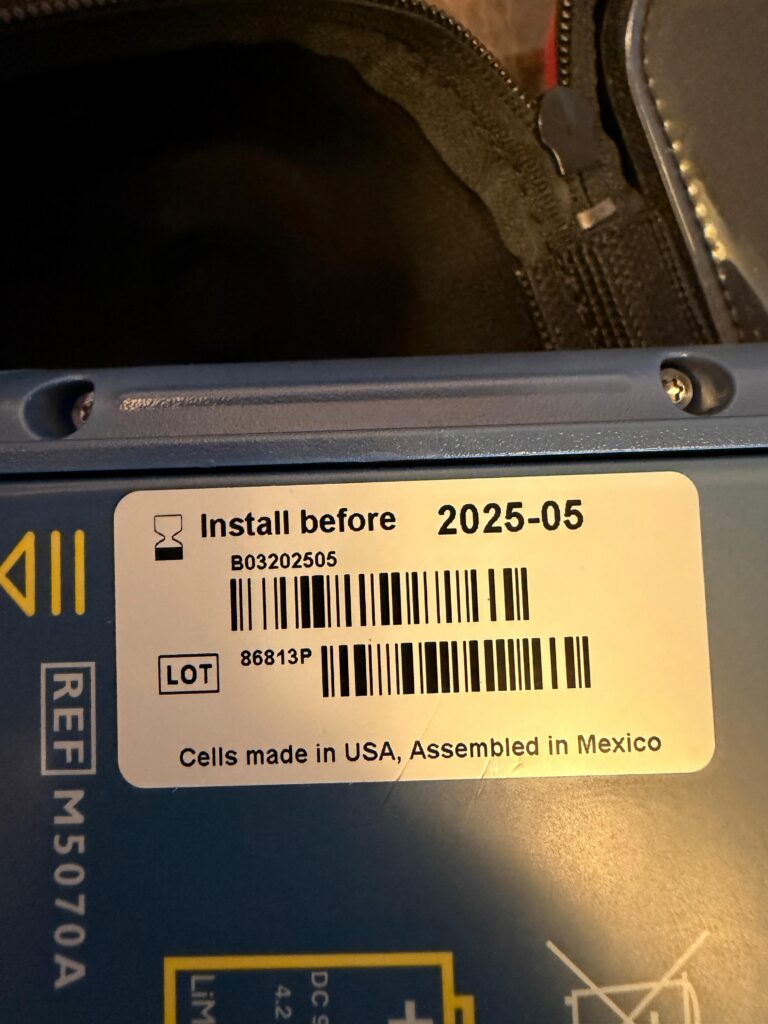
| Install-by date on the label | Battery was made | Philips warranty ends |
|---|---|---|
| 2029 | 2023 | 2027 |
| 2031 | 2025 | 2029 |
| 2032 | 2026 | 2030 |
The four years starts at the factory
The four-year warranty is counted from the day the battery was made, not the day it goes into your AED, which is why the install-by date sits further out than the warranty does. Most batteries go into service well before their install-by date, so this mostly comes into play with spares that have been kept in a closet for a while.
Why the six-year window makes sense
Here’s how we see it: a Philips battery doesn’t go straight from the factory to your wall. Distributors keep a healthy inventory on hand, which is a big part of why a replacement can ship the week you order it instead of waiting on a production run. The six-year install-by window gives a battery room to spend some time on a shelf and still arrive with plenty of useful life.
That’s a good trade-off for everyone, and it’s also why a new battery won’t always show a full six years on the label. A little less is completely normal.
Why you’ll find different answers online
The Philips HeartStart FRx Owner’s Manual lists a shelf life of at least five years from the date of manufacture and a standby life of “typically, 4 years,” but it doesn’t spell out how the install-by date fits with either one. So it’s no surprise that explanations around the web vary a bit. If you’ve read something different, that’s likely why.
A quick note: this guidance came from a phone call with Philips support on November 4, 2026, rather than a published Philips document. If you’d like to confirm it, especially before a warranty claim, you can reach Philips AED support at 866-333-4246 (option 1) or online at philips.com/AEDsupport.
Does the battery stop working when the warranty ends?
No, and Philips was clear about that. A battery past its warranty date may still have plenty of life left. Their advice is to keep a spare on hand and listen for the low-battery chirp, or simply replace it once the warranty ends. It’s a warranty date, not a failure date.
If yours is getting close, a new battery runs no more than $250, which isn’t much for the peace of mind of knowing it’s covered.
A simple routine for new batteries
- Jot down the install-by date when a battery arrives. Most will read somewhere around five to six years out, depending on how long the battery spent with the distributor.
- Work out the warranty end date (install-by minus two years) and note it alongside the day you installed it.
- Add a calendar reminder for the warranty end date, so you can plan a replacement or have a spare ready.
A real example
A municipal parks department we work with had an AED stored in a shed at one of its parks. The battery label read install-by 2026, and no expiration date had been recorded anywhere. Using the formula, that battery was made in 2020 and its warranty ran through 2024.
The AED’s serial number dated the device to October 2020, so it was most likely the original battery that came with it. It was an easy fix once we knew what to look for, and a good reminder that the date on the label holds more information than it first seems.
Which batteries this applies to
This applies to the Philips M5070A battery, used in the HeartStart OnSite, HS1 and FRx. Other AEDs, including ZOLL, Stryker and Cardiac Science models, use their own dating, so this rule doesn’t carry over to them.
Keeping track
Tracking a few dates per AED works fine on a spreadsheet, as long as someone updates it each time a battery or pad pack changes. That’s the kind of thing an AED management program handles for you. Our GreenLight AED program keeps track of the battery and pad dates on every device and gives you a heads-up before anything comes due.
If you’d like a hand reading the batteries you already have, we’re happy to help. Give us a call or text in North Carolina at (919) 372-9657, or in Florida at (954) 947-5060.